
📌Platform Updates
- Table filter & sorting summary and Saved Views dropdown
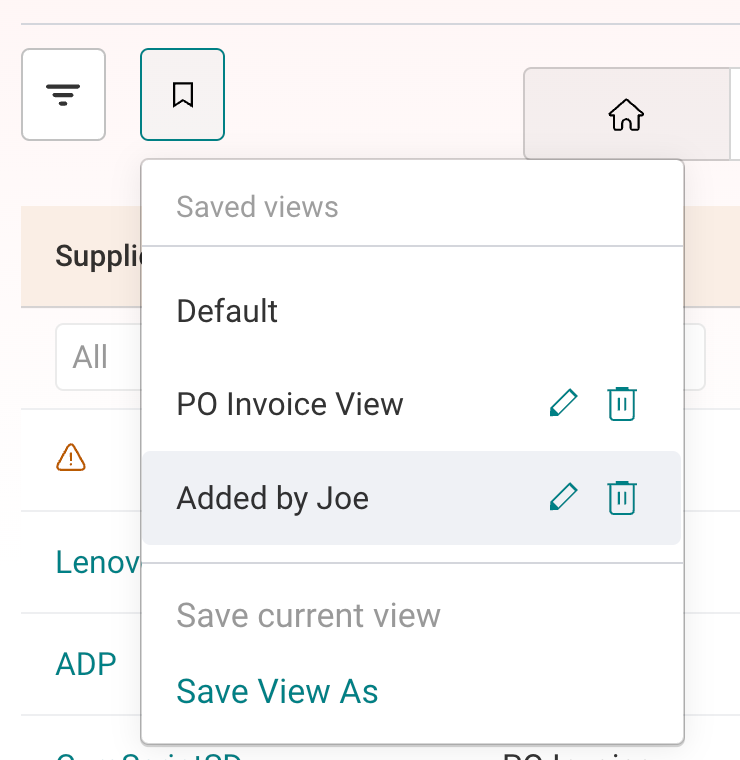
Tables now have a Filter icon that shows a summary of applied filters and sorting, with clear-all or clear-one options. Saved Views can be switched from a direct dropdown. Applies to AP and AR.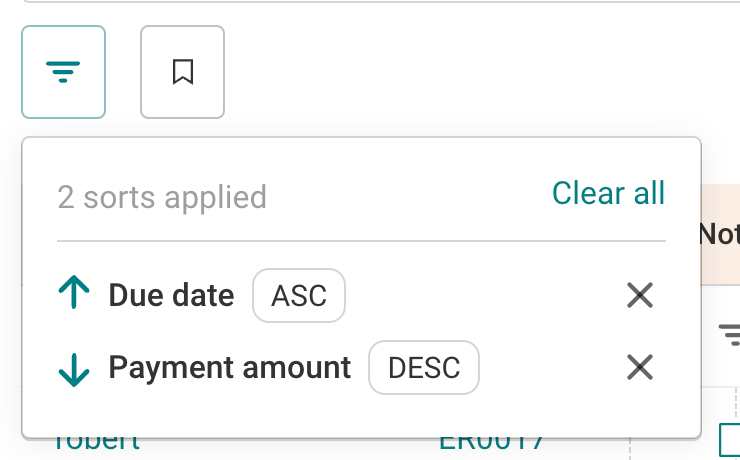
📌Accounts Payables
- Receipt-based matching for NetSuite and Sage Intacct
PO matching users can directly link open invoices to receipts. This process enables a deeper and more accurate level of line matching in purchasing. Learn more - Backup approvers and custom tier labels for invoice approvals
Each approval tier can have a backup approver who gets the invoice if the primary doesn't act within the escalation threshold. Learn More
Tiers also get an optional custom display label (e.g. "Received By"). Learn More - Receipt processing workflow: option to skip approval
When the "Require approval on matched PO invoices" setting is set to No, invoices whose totals match the Receipt total will skip approval. - Setting to disable approval actions in invoice approval emails
New setting to remove Approve, Reject and Hold actions from invoice approval emails, so approvers must log in to Centime to act. Backend-managed for now. - "Added By" as an invoice approval policy condition
Approval policies can now trigger based on who added the invoice. This is useful to clients who want to route it to a specific user's manager. For emailed invoices, it triggers when the sender's email matches a Centime user. - Payment approval notifications for repeat approvers
Approvers assigned to multiple payment approval levels now get a notification at every level, even if they already approved at an earlier one. - Subsidiary prediction using PO number
When a PO number is extracted, Centime uses it to predict the subsidiary, only if one hasn't already been identified. - Assign invoices to the current open posting period
Backend setting that assigns invoices to the current open posting period on upload, regardless of invoice date, and revalidates it at posting.
This is available only upon request. If interested, reach out to cs@centime.com. - Add more files after initial upload
Users can now add additional files to the upload screen even after selecting or uploading their initial set of documents. Previously, users had to select all files at once or restart the upload process to include any missed documents. - Tax % visibility on invoice lines
Tax code names now show their percentage (e.g. VAT_GBP_GST_5 (5%)), and Tax Amount and Gross Amount columns are added to the invoice line table. Learn more - Tasks pre-fill from the Document Viewer
Creating a task from the Document Viewer now pre-fills Area, Supplier, Relates to, Document number and Due date. - PO support in QuickBooks Online
Extend Purchase Order (PO) processing support to QuickBooks Online, enabling users to process PO-backed invoices in Centime.
Scope: The initial release will support 2-way PO matching only, allowing invoices to be matched against their corresponding Purchase Orders. 3-way matching, including receipt-based validation, will not be supported at this stage. - MS Dynamics
Enable invoice and payment processing for clients using Microsoft Dynamics 365 Business Central, including support for Purchase Order (PO) matching as part of the invoice processing workflow.
This integration will allow clients to manage their end-to-end Accounts Payable workflows in Centime, from invoice processing and PO matching to payment execution, with transactions synced to Microsoft Dynamics 365 Business Central.
📌Accounts Receivables
Cash Application
- Future-Dated Payments Matching
Matches are now supported between payments, invoices, and credit memos irrespective of transaction dates, eliminating manual matching efforts for future-dated records. - Smarter Customer Identification via Invoice Numbers
The customer matching rules engine now places higher priority on invoice numbers found within remittance details, driving greater auto-matching accuracy for paying buyers. - Flexible GL Adjustments for Non-Invoice Amounts
Users can now post advances, intercompany payments, and other non-invoice funds directly to any selected GL account, mirroring surcharge handling to maintain balance accuracy. - Unapplied Payment Terminology & Streamlined Workflow
Renamed Advances/Prepayments to Unapplied Payments for clearer identification, while decoupling GL account selection since Unapplied Payments sit on the Customer. - Enhanced Matching for Parent-Child Buyer Hierarchies
Resolved buyer misallocations where parent and child accounts share payer names or remittance references, ensuring payments and invoices route to the proper child entity. - Refined Duplicate Payment Detection
Incorporated payment numbers into duplicate check criteria to minimize false positive flags across similar transaction records. - Default AR Account Selection in Cash App Settings
Added an AR field directly within the Cash App settings for non-invoice related payments.
AR & GL Sync
- 'To Be Emailed' field Support for NetSuite
Retrieve and retain contacts directly from individual NetSuite invoices' 'To be Emailed' field, ensuring targeted delivery for receivables outreach and notifications. - NetSuite Invoice Supporting Document Sync
Attachments associated with NetSuite invoices automatically sync into Centime, providing centralized document visibility for teams and buyers. - Rule-Based Invoice Exclusion Filters
Configure custom criteria to exclude specific internal or intercompany invoices from syncing into AR workflows, keeping collections views focused.
Communications
- Refined Email Layout and Formatting
Corrected spacing and alignment irregularities in automated customer emails to present a polished communication template.