
Contents:
- Accounts Payable
- Accounts Receivable
📌 Accounts Payable - Invoice Automation
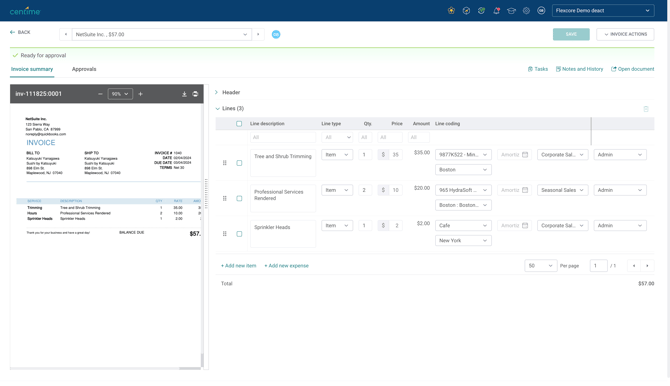
- A redesigned Invoice Summary tab to eliminate current IA pain points.
- The document viewer now dynamically scales to the screen, using the full width for better visibility.
- Users can easily adjust the invoice summary and PDF view to suit their preferences.
- With a single line table there will be no more back-and-forth between the invoice summary and coding tab.
- Improvements have been made to the responsiveness and overall speed.
- Suppress posting of certain invoices
Users can suppress posting to the General Ledger, allowing those invoices to remain only within Centime. This capability is available as an on-request backend setting.
Explained here. - Auto-Coding for multi-subsidiary netsuite clients
Centime has extended auto-coding capabilities to multi-subsidiary clients. The invoice’s subsidiary will now be auto-coded, and the invoice line details will also be automatically coded.Explained Here - Location column in Sage Intacct to provide multi-entity visibility
Location can now be added as a column in the AP tables, giving users upfront visibility into the entities associated with each invoice. Explained Here -
PHI Visibility for Limited Access Roles
Limited Access users can now be granted permission to view PHI, ensuring approvers have the context they need to make informed approval decisions.
📌 Accounts Receivable
- Customer Portal Payment Improvements:
- Multiple Payment Methods: Buyers can now save and select multiple cards and bank accounts for easier checkout across different projects/teams.
Read More here.
- Multiple Payment Methods: Buyers can now save and select multiple cards and bank accounts for easier checkout across different projects/teams.
-
- Intuitive Default Payment: The "Payment Method" column is removed from the Unpaid tab. The system now defaults to the last payment method used, simplifying the selection process. Autopay setup still requires explicit selection.
Read More here.
- Intuitive Default Payment: The "Payment Method" column is removed from the Unpaid tab. The system now defaults to the last payment method used, simplifying the selection process. Autopay setup still requires explicit selection.
- Partial Payment Settings:
- Flexible Admin Control: Admins can set global and per-customer rules for allowing partial payments under Settings > Receivables > Online Payments > Payment Preferences.
- Rules can be based on invoice amount (≥ X amount or < X amount).
- Customer Portal Experience: Buyers can edit the payment amount if it meets admin rules. Thresholds block invalid amounts. Credits are selectable and applied; early-pay discounts are auto-calculated but confirmed in a popup.
- Flexible Admin Control: Admins can set global and per-customer rules for allowing partial payments under Settings > Receivables > Online Payments > Payment Preferences.
Impact: Increased payment flexibility for buyers and enhanced collection control for admins.
Read More about Partial Payments & Multi-Payment Method Support
- NetSuite Undeposited Posting Enhancement:
- Individual Invoice Posting: A new setting supports Individual Invoice Posting for clients needing precise credit-to-invoice matching. Each invoice posts separately with its own credits/discounts, but a shared Payment ID maintains grouping visibility.
Impact: Correct credit allocation in NetSuite, reducing reconciliation errors.