
Contents:
Accounts Payable
Accounts Receivable
Cash Forecasting Workbench
📌 Accounts Payable
PO Matching
-
Facilitate Billing before receiving
-
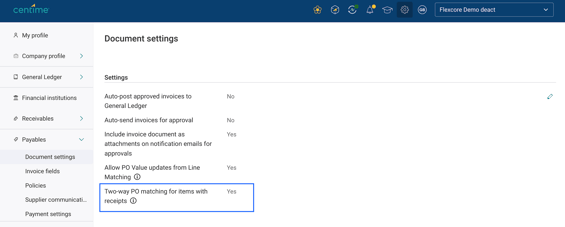
Two-way matching settings that allow invoices to be linked directly to POs without requiring a receipt. This can be enabled in the document settings and also at the supplier level. Learn More
-
-
-
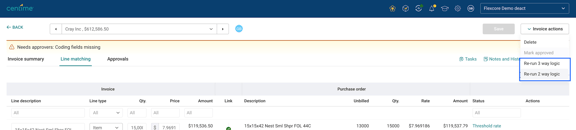
Selectively re-run invoice matching using either two-way or three-way matching logic. Allowing flexible line linking decisions at an invoice level. Learn More
-
-
Smarter line linking with unique-rate matching
-
Invoice and PO lines are now automatically linked when a unique rate based match is found. This improves line linking accuracy for blanket POs and partial billing scenarios.
-
Invoice Automation
- Select invoice approval policy in the approval tab
-
- Select an alternate approval policy directly from the Approval tab. This is especially useful when a valid approval policy cannot be automatically determined.
- When aggregate capture enabled, use captured invoice amount
-
The invoice amount captured from the document is used as the line amount to prevent incorrect calculations for aggregate capture.
- Expanded inventory detail support with a custom field
- Manually enter inventory detail numbers in a line-level text field, enabling more flexible processing of inventory detail related invoices.
- Mandatory memo and posting period option
- Provide the option to make Memo and Posting Period required fields, helping reduce manual corrections and improve accounting accuracy.
- Supplier default of form type for Sage Intacct
- Invoice form types can be configured at the supplier level, enabling supplier specific processing rules and faster invoice handling.
- Non-posting invoice audit history
- Improved audit visibility by adding descriptive history entries whenever an invoice is marked as non-posting or reverted to a the regular posting state.
Payments Automation
- Payment Number Visibility
- Provide better reporting context in the Paid tab by displaying the payment number associated with each transaction.
- Improve the Invalid ACH account logic
- Reduce false positives by marking ACH details as invalid only when they are explicitly identified as invalid by the bank.
📌 Accounts Receivables
- Expanded Custom Field Support for AR
- Custom fields in AR now support the date type; previously, only text and list types were available.
- Enhanced Credit Memo Visibility in CS Portal
- Buyers can now see Credit Note descriptions in the side panel by adding a "Description" column to their view, making it easier to know which credit notes to apply.
- Upfront Surcharge Disclosure
- Before opting into AutoPay with a credit card, buyers can now view any applicable surcharges.
📌 Cash Application - Phase 1
Merchants can now streamline the most labor-intensive phase of Accounts Receivable by automating remittance interpretation and invoice matching. This update facilitates a comprehensive payment application journey - from initial ingestion to General Ledger posting - ensuring accounting accuracy.
Key Features
- Remittance Ingestion
- Ingest PDF, image, CSV, and email-forwarded files alongside lockbox data.
- Matching Engine
- Identify buyers and invoices using exact and fuzzy matching on structured data.
- Full Payment Lifecycle
- Automate full, partial, short, and overpayments, including parent-to-child invoice application.
- Adjustment Types
- Manage discounts, credit memos, deductions, fees, and surcharges with precise GL treatment.
- GL Aligned Posting
- Mirror ERP workflows (AR →Undeposited Funds → Bank) for Sage Intacct, NetSuite, and QBO.
- Configurable Deposit Posting Timing
- Make Manual Deposit Posting
- Automate Deposit Posting with T+N timelines
- Define custom T+N deposit posting windows as per payment method (Wire, ACH, Card, Check, Lockbox).
📌Cash Forecasting Workbench
Cash Forecasting Workbench is an AI-powered decision workspace that helps finance teams analyze, and optimize their 13-week cash flow forecast. It combines forecast visibility, scenario planning, manual adjustments enabling finance leaders to quickly evaluate liquidity risks, test business assumptions, and make informed cash management decisions.
Key Features
- 13-Week Cash Flow Forecast with grouped visibility across customers, suppliers, GL accounts, with consolidated visibility into projected inflows, outflows, and ending cash balance.
- Scenario Modeling to evaluate the impact of operational, revenue, expense, and timing changes on future cash positions using a list of predefined industry specific and industry agnostic prompts.
- Natural Language Scenarios allowing users to describe business events in plain English and automatically generate forecast adjustments.
- Scenario History to track applied scenarios and Undo, Redo, and Reset Controls for safe experimentation and rapid comparison of different cash outcomes.
- What-If Analysis Engine to assess liquidity impacts under varying business conditions and stress scenarios.