
What’s New
- Buyers can save multiple cards or ACH accounts in their customer portal.
- Settings > Payment Settings > Add an ACH account or > Add a Credit Card
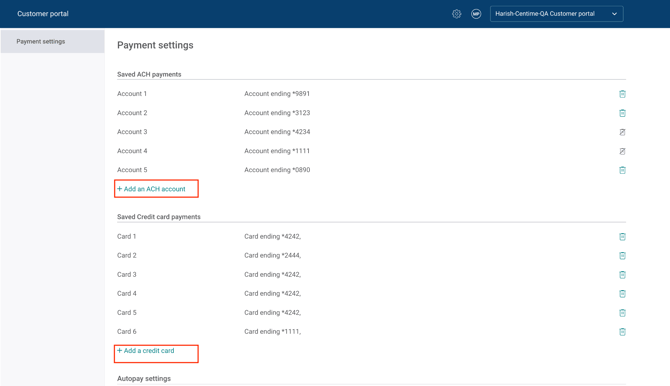
- Buyer can switch payment methods from the dropdown on the fly while making payments.
- All saved Bank accounts (ACH) and Cards will be available to from the drop down.
- The system now defaults to the last payment method used, simplifying the selection process.
-
- Buyer can still change preference for the payment by clicking on the dropdown and selecting from a range of saved card or bank accounts.
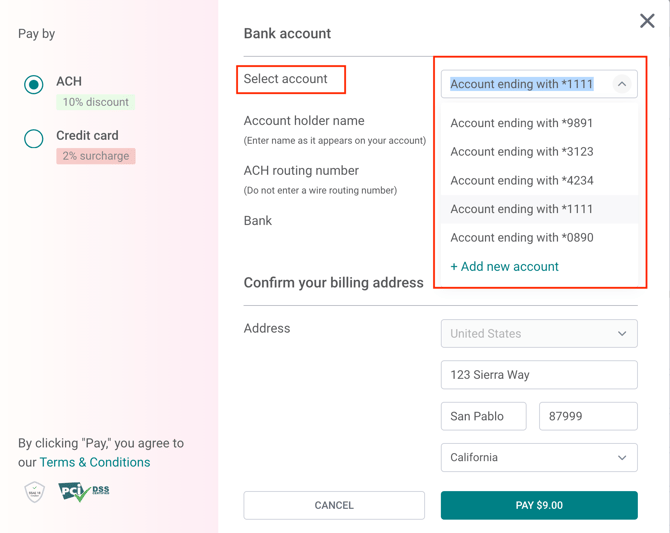
- They can change their preferred payment method directly during checkout - no need to delete or re-add a card.