
The Problem We Solve
Most companies don't struggle with receiving payments. They struggle with understanding them.
Money arrives in the bank, but what it represents - which customer, which invoices, which deductions — has to be figured out manually.AR teams sift through PDFs, emails, spreadsheets, lockbox files, and customer portals every day just to answer one question: how do we apply this payment?
The volume compounds the pain. Here's what AR teams are dealing with:
- One payment covering 15 invoices across three subsidiaries
- A parent company paying on behalf of a child entity, with no reference numbers
- A short payment with an undocumented deduction buried in a PDF
- A lockbox file bundling payments from 40 customers into a single bank deposit
- Remittance arriving via email with an attachment that was scanned sideways
Every one of those scenarios requires someone to stop, investigate, and manually resolve the match. That's the bottleneck our Cash Application solution eliminates.
How is Centime's Cash Application different?
Most cash application tools start with the bank transaction and work backward.
Cash App starts with remittance — which is where the actual work happens.
|
Traditional approach |
Receives bank transaction → manually hunts for remittance → interprets → applies |
|
Centime Cash Application approach |
Ingests remittance first → AI extracts & interprets it → engine matches invoices automatically → posts to General Ledger |
|
Why it matters |
Remittance is where complexity lives. Starting there means we automate the hard part, not just the visible part. |
This isn't a matching tool with an AI label on it. The AI is doing real interpretive work — reading unstructured remittance formats, identifying customers from partial references, inferring invoice intent from context — so your customer doesn't need to clean up their data before we can process it.
How It Works
Cash Application process follows a straightforward flow that mirrors how your AR team already thinks about cash application — just without the manual effort at each step.
Step 1. Ingest & Interpret:
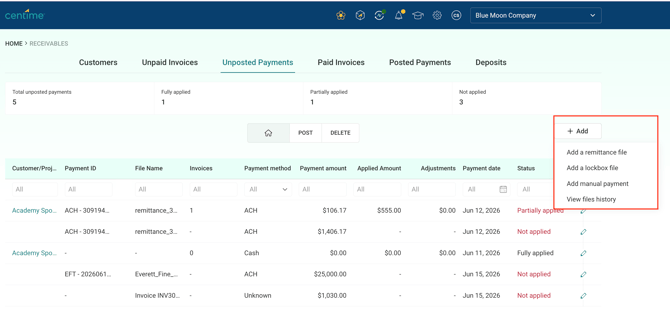
Remittance comes in from any source: email, PDF, image, CSV, lockbox file, or manual entry. You upload it in the Cash Application Solution
The system ingests and reads the remittance — structured or not — and extracts customer identity, invoice references, payments amounts.
Step 2. Match Payments to Invoices
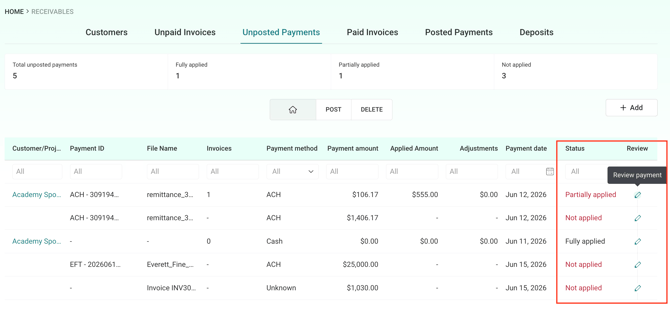
The matching engine links payments to open invoices using customer reference, invoice numbers, amounts, entity relationships, and fuzzy signals.
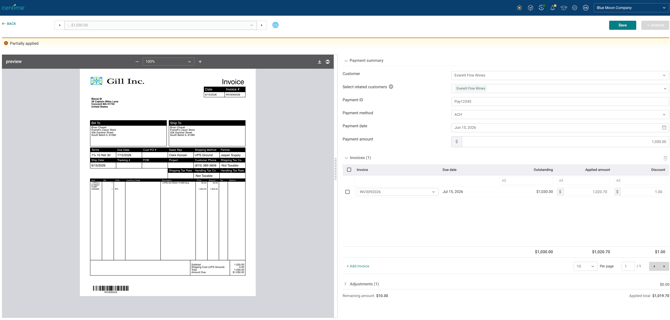
Based on the matching engine, the system automatically applies the amounts, and the payment is classified as Fully Applied, Partially Applied, or Not Applied with an option to review these individually and correct any matches before posting and creating any GL impact.
 4. Step 3. Apply & Review
Payments are allocated across invoices, including partial payments, overpayments, deductions, credits, and multi-entity scenarios.
Step 4: Post to Undeposited funds
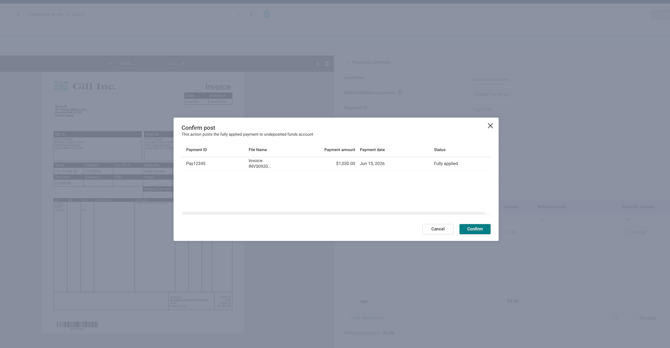
Once reviewed and Fully Applied, the payments can be posted to your Undeposited funds in the General Ledger and will automatically oved to the 'Posted Payments' tab view with the posting status.
Step 5: Bank Deposit Posting
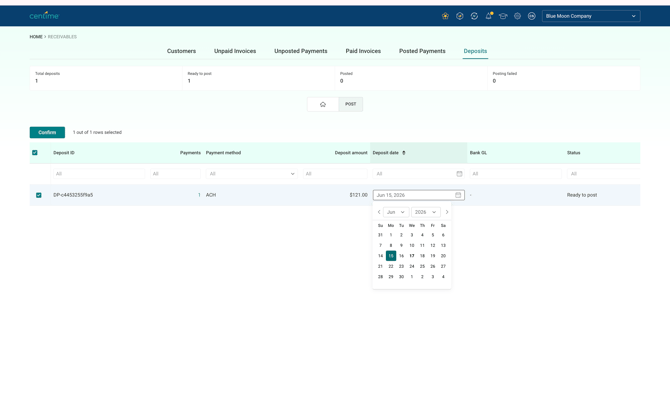
Funds can be moved from Undeposted Funds account to Bank Deposit account, once you know when the funds hit your bank account.
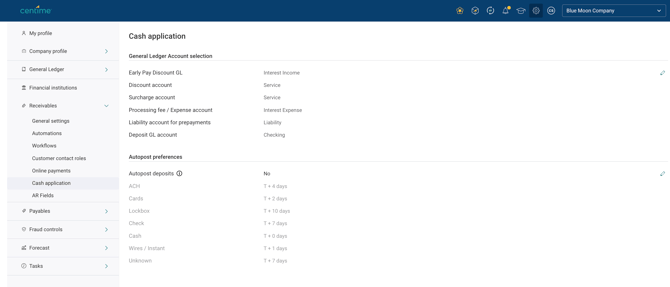
Create Deposits in your GL Ban account either manually (edit the Deposit Date) or automatically based on the payment method and settlement timeline (T+N) as set up in the Cash Application preferences & settings .
Key Scenarios to Know
Standard Remittance Processing
A customer sends a payment — wire, ACH, check — with remittance attached. Cash App ingests the remittance, identifies the payer, matches the open invoices, and prepares the application for posting.
|
Example A customer submits $87,500 covering seven invoices with a PDF remittance. Cash App slreads the PDF, identifies each invoice, reconciles a $200 discount, and presents a complete application ready for one-click approval — no manual lookup required. |
Lockbox Processing
Lockbox introduces a layer of complexity most tools handle poorly. A single bank deposit bundles payments from dozens of customers, and someone has to untangle it.
Cash App processes the lockbox file, separates each customer's payment, matches their invoices independently, and maintains a full audit trail linking every customer application back to the consolidated deposit. The accounting stays clean without any manual splitting.
|
Why Lockbox Matters Lockbox is one of the most labor-intensive workflows in AR — and one of the last to get automated. If your team processes checks through a bank lockbox, this is where Cash App delivers some of its most immediate impact. |
Payment Complexity We Handle
Cash App is built for real-world AR, not textbook scenarios. Here's the range of payment types the platform manages automatically:
|
Payment Type |
How Cash App Handles It |
|
Full payments |
One payment, one invoice. Straightforward — and handled automatically. |
|
Partial payments |
Customer pays less than the invoice total. Applied and flagged for review. |
|
Multi-invoice payments |
One payment covering many invoices. Cash App matches each line. |
|
Short payments |
Payment is less than expected. Difference tracked with audit visibility. |
|
Overpayments |
Customer pays more than owed. Credit is tracked and managed. |
|
Parent-to-child payments |
Parent entity pays invoices belonging to subsidiaries. Entity relationships are resolved automatically. |
|
Multi-entity allocation |
Payment needs to be split across legal entities. Handled without manual journal entries. |
|
Deductions |
Customer deducts discounts, chargebacks, or other amounts. Tracked with appropriate accounting treatment. |
Remittance Sources We Accept
One of the most common prospect questions: "What if our customers send remittance in different formats?" The answer: we handle them all.
- PDF remittance advice (including scanned documents)
- Email-forwarded remittance
- Images and photographed documents
- CSV and Excel spreadsheets
- Lockbox files - Excel/CSV (structured data)
- Manual payment entries
Support for bank payment data ingestion is part of our broader Cash Application roadmap, but it is not available today.
We also do not currently support importing standard bank payment/reporting formats, including BAI2, CAMT, MT940, or NACHA.
ERP Integration & Financial Posting
Cash App integrates with leading mid-market ERP platforms and mirrors the standard AR payment lifecycle:
|
Accounts Receivable → Undeposited Funds → Bank |
Supported ERPs
- NetSuite
- Sage Intacct
- QuickBooks Online/Desktop
Deposit Posting Options
AR teams can choose manual control or automated deposit posting. For automated posting, settlement windows are configurable by payment method:
|
Payment Method |
Typical Settlement Window |
|
Wire |
T+0 to T+1 |
|
ACH |
T+3 to T+5 |
|
Card |
T+1 to T+2 |
|
Check |
T+5 to T+7 |
|
LockboxUpto |
T+10 |
Custom posting windows can be configured to match a customer's internal accounting policies.
Who Benefits Most
Organizations with the Highest Fit
Cash App delivers the most value where cash application is a genuine operational bottleneck — not a minor inconvenience. Common indicators include:
- High payment volume with diverse remittance formats
- AR team spending significant time on manual matching and research
- Lockbox or check-heavy payment workflows
- Multiple legal entities or parent-child customer relationships
- Shared-service AR teams managing high transaction counts
- Current backlog of unapplied cash
- Growing business outpacing AR team capacity
Questions Worth Asking Your Team
Not sure if Cash App is the right fit for your organization? These are the questions that tend to reveal the most:
|
Area |
Question |
|
Payment volume |
How many payments does your AR team process each month — and is that number growing? |
|
Remittance formats |
What formats do your customers use to send remittance? Email, PDF, customer portals? |
|
Lockbox |
Do you receive check payments through a bank lockbox? |
|
Manual effort |
How much time does your team spend manually matching payments to invoices each week? |
|
Unapplied cash |
Do you track unapplied cash? What does that balance typically look like? |
|
Entity complexity |
Do you have parent companies paying on behalf of subsidiaries or child entities? |
Business Outcomes
|
Reduced manual effort AR teams spend dramatically less time on repetitive matching and research. |
Faster payment posting Payments move from received to posted without manual bottlenecks. |
|
Higher matching accuracy AI-assisted interpretation reduces mismatches and misapplied payments. |
Less unapplied cash Payments that used to sit unmatched get resolved automatically. |
|
Scalable AR capacity Teams handle more volume without adding headcount. |
Audit-ready records Every application and adjustment is tracked with full accounting visibility. |
What's Coming
- Buyer Advance Creation and Application
- Confidence scoring on matches — so teams know exactly where to focus manual review
- Enhanced exception management workflows
- Multi-currency support
- Expanded AI matching capabilities
- Additional ERP integrations beyond NetSuite, Intacct, and QBO
Common Questions
|
Question or Concern |
How to Think About It |
|
"We already have a cash application process — it just takes too long." |
That's the most common starting point. Cash App is specifically built to reduce the manual work in an existing process — not replace it wholesale. The question is where your team spends the most time, and whether that can be automated. |
|
"We tried automating cash application before and it didn't work." |
Most tools start with the bank transaction and work backward. Cash App starts with remittance, which is where the actual complexity lives. That distinction tends to be the difference between automation that sticks and automation that doesn't. |
|
"Our customers send remittance in too many different formats." |
That's what Cash App is designed for. PDFs, emails, images, spreadsheets, lockbox files — your customers don't need to change how they send remittance. The platform adapts to the formats they already use. |
|
"How does this fit into our existing GL?" |
Cash App integrates with NetSuite, Sage Intacct, and QuickBooks Online and QuickBooks Desktop, and follows standard AR posting workflows. |